Time flies with great content! Renew in to keep enjoying all our premium content.
Prime
New HP Officejet wireless printer sets the bar high
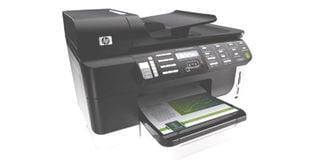
The Pro 8500’s duty cycle runs up to 15,000 pages per month, making it ideal for any small- to medium-size business. Photo/FILE
The HP Officejet Pro 8500 wireless all-in-one inkjet printer is a near-perfect solution for small businesses and home offices hunting for a device that can print, scan, fax, copy in record time, all with high-quality results.
This printer sets the bar high in terms of all the features it manages to pack into a relatively small footprint: autoduplexing, 802.11b/g, a 3.45-inch touch screen, 50-sheet automatic document feeder, and a legal-size scanner are only some of the extras this machine has to offer.
Some will balk at the $399 price tag, but spend half an hour with the Pro 8500 and we’re sure you’ll want one of your own.
Design and features
The Pro 8500 is the HP Officejet J6480’s older, more accomplished brother.
The larger capacity paper trays actually make it larger than the J6480, measuring a meaty 19.45 inches wide by 18.86 inches deep and 13.03 inches tall.
Most of the bulk is because of the built-in features including the autoduplexer, 50-sheet automatic document feeder, and legal-size scanner bay, all of which contribute to the footprint, which isn’t so unwieldy when you consider the average size of a heavy-duty colour all-in-one laser.
Like the J6480 and other HP printers in the Officejet line, the Pro 8500 retains the matte white and gray panels with a glossy black cockpit in the centre that blends easily into a variety of decors.
The centre console is neatly organised with a 3.45-inch colour LCD touch-screen display right in the middle.
Although competitive devices like the Brother MFC-990CW do have larger screens, bigger isn’t always necessarily better; in this case, HP proves the rule with a highly functional, easy-to-use heads-up display.
The home screen shows all of the most commonly used option menus including Copy, Fax, Scan, and Photo preferences, a quick setup menu, and a graphical gauge that shows you almost precisely how much ink you have left in the tanks.
The rest of the front panel has a full telephone keypad for typing in fax numbers, a collection of quick access fax and copy buttons, a “Digital Filing Networking Folder” button that lets you scan and manage your images over a network, and a general “E-mail” button for one-touch scan delivery.
Finally, the bottom of the front panel also has an external card reader that supports PictBridge USB, xD, Memory Stick, SD, and Compact Flash.
HP gives you the option to pair the Pro 8500 to a host computer in three ways: over a network with the built-in Ethernet port, direct connection through a USB 2.0 cord, and through 802.11 b/g networking.
We followed the onscreen instructions and successfully paired the printer with our desktop computer in less than 10 minutes.
From there, we connected satellite computers to the printer by simply installing the driver onto the other desktops.
The process of setting up a wireless network with your printer is typically a painful process, requiring special network configurations and system changes, but the Pro 8500 slowly guides you through the setup with onscreen instructions that we found easy to follow and troubleshoot.
The large 250-sheet input drawer is fixed into the machine, but the top comes off for when it comes time to refill your media.
In addition, you can extend the tray outward to accommodate A4 and legal-size paper and it also has an arm to corral loose prints. -
Unlock a world of exclusive content today!Unlock a world of exclusive content today!