Time flies with great content! Renew in to keep enjoying all our premium content.
Prime
Squeezebox Radio offers many extras but for less money
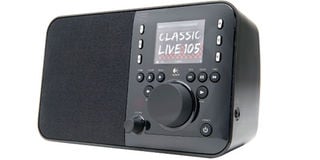
The Logitech Squeezebox Radio can stream thousands of Internet radio stations, but is also adept at handling music. Photo/FILE
The Squeezebox Boom has been our favourite Wi-Fi radio for some time now, but any tabletop radio that costs around $300 is going to have limited appeal.
The Logitech Squeezebox Radio ($200) is designed to offer almost everything that’s good about Boom in a smaller package and for less money—and it succeeds.
Like every Wi-Fi radio, the Squeezebox Radio can stream thousands of Internet radio stations, but it is also adept at handling music stored on a PC, tonnes of online music services (Pandora, Rhapsody, Slacker, Last.fm to name a few), podcasts, and even photos via Flickr.
The Squeezebox Radio’s physical design is uncommonly refined, with an eye-catching colour screen and superb layout of the front panel controls.
Most of our complaints are nitpicks. Logitech charges extra for an accessory pack that includes a remote and a battery pack; $50 to make the Squeezebox Radio portable is fair, but the remote should have been included.
The initial setup will be daunting to those new to streaming music over a home network, but after the initial time investment, it’s smooth sailing.
The Squeezebox Radio is more expensive than competing options like the Grace GDI-IR2000, the Livio Radio, and the VTech IS9181, but in this case it’s worth paying extra for its outstanding design, unparalleled feature set, and solid sonics.
We’ve raved about the Squeezebox Radio’s exterior design since we first saw images of it and our time with the product hasn’t diminished our praise. It gets just about everything right.
The cabinet is made of plastic, but has a solid feel and the glossy finish is stylish, although it does attract dust/fingerprints (it’s available in black or red).
The back panel has a built-in handle, which makes it easy to move from one room to the next.
From the front, there’s a speaker grille on the left side, and the right side has the controls and colour display. The built-in handle on the back makes the Squeezebox Radio easy to tote.
The large knob in the centre handles navigation. Pushing the button while browsing menus confirms a choice; when a song is playing, it brings up more options, such as “thumbs up/down” controls for Pandora.
There’s a separate, smaller volume knob, which is a plus, since many Wi-Fi radios (including the earlier Squeezebox Boom) combine navigation and volume control in one knob.
Pushing the volume knob activates mute. The other soft buttons handle other crucial functions, including a shortcut to alarm functionality.
The six buttons lining the display access Internet radio presets, which are set by holding the buttons down while listening to a station.
Overall, the control scheme has a slight learning curve, but everything made sense after a little fiddling.
The Squeezebox Radio features a 2.4-inch colour LCD display, a feature we’ve seen on two other Wi-Fi radios, the VTech IS9181 and Philips NP2900.
The display can get plenty bright--which is a good thing--but it can also make for an unwanted nightlight in your bedroom.
The Squeezebox Radio handles this with an autodimmer function.
Although it works, we found it to be too aggressive; once we turned the lights off, the screen looked like it was off from across the room and we couldn’t see the time.
(It’s visible when you get up close.) It’s a nitpick, but we’d love for Logitech to hone this feature or make it more customizable so you can set your own “dim” level.
While most Wi-Fi radios are stuck with plain text menus, the Squeezebox Radio features a relatively high-resolution screen, with a graphical user interface.
cnet
Unlock a world of exclusive content today!Unlock a world of exclusive content today!